Remote DB2.0.1.7
Publisher Description
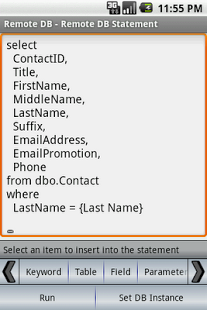
Remote DB is a powerful database client that brings the power of your databases to your fingertips. You can now access all of your databases from your mobile device. You are able to easily run queries, view data, make updates and schema changes; any commands that can be executed against your databases are now available from your mobile device.
Among Remote DB’s many features are:
- SQL statements can be saved for repeated execution.
- Statements can be parameterized to easily provide different criteria with each execution.
- Statement templates provide an easy method of creating statements. Select a template and let Remote DB retrieve your database schema and generate statements for you.
- Manage your statement information at http://remotedb.net and sync your phone with your online account.
- The query results grid allows you to scroll vertically and horizontally through the results.
- A detailed record view allows you to navigate query results a single record at a time.
- Access databases behind a firewall by configuring your device’s VPN connection.
Remote DB supports client access to the following database environments:
- MS SQL Server
- MySQL
- PostgreSQL
- Sybase ASE
About Remote DB
The company that develops Remote DB is Curly D, LLC. The latest version released by its developer is 2.0.1.7. This app was rated by 1 users of our site and has an average rating of 4.0.
To install Remote DB on your Android device, just click the green Continue To App button above to start the installation process. The app is listed on our website since 2013-03-03 and was downloaded 130 times. We have already checked if the download link is safe, however for your own protection we recommend that you scan the downloaded app with your antivirus. Your antivirus may detect the Remote DB as malware as malware if the download link to com.quickDB is broken.
How to install Remote DB on your Android device:
- Click on the Continue To App button on our website. This will redirect you to Google Play.
- Once the Remote DB is shown in the Google Play listing of your Android device, you can start its download and installation. Tap on the Install button located below the search bar and to the right of the app icon.
- A pop-up window with the permissions required by Remote DB will be shown. Click on Accept to continue the process.
- Remote DB will be downloaded onto your device, displaying a progress. Once the download completes, the installation will start and you'll get a notification after the installation is finished.
Program Details
System requirements
Download information
Pricing
Version History
version 2.0.1.7
posted on 2013-03-03
version 2.0.1.0
posted on 2011-04-02
Several fixes and updates
